USPS new terminology

Starting Feb 11th, USPS "Delivery Confirmation Numbers" are no longer called that. It is now called "USPS Tracking #". Same for signature confirmation.

See our Endicia partner site for details

Posted in Site Updates | Tagged , , | 836 Comments

What version of QuickBooks does your software support

As per Intuit:

Web-based software applications that can be used with QuickBooks Web Connector have been designed to communicate with some or all of the following QuickBooks products:

• U.S. editions of QuickBooks Financial Software products
• QuickBooks Enterprise Solutions
• QuickBooks Premier (2002 or later)
• QuickBooks Pro (2002 or later)
• QuickBooks Simple Start (2006 or later)
• QuickBooks Point of Sale (v.4.0 or later)
• Canadian editions of QuickBooks (2003-2009)
• UK editions of QuickBooks (2003-2008)

Purchasing QuickBooks
Teapplix alllows you to purchase latest QuickBooks products directly from Intuit with a 20% discount:
http://www.teapplix.com/blog/supplies-store/

Posted in QuickBooks Integration | Comments Off on What version of QuickBooks does your software support

Buy.com import options

We now have an option to control buy.com import. This option allows you to choose whether to import item name from buy.com, or ReferenceId which is the SKU.

This setting currently is not visible in our web interface. If you would like to change import options please use the contact us link.

Posted in Site Updates | 538 Comments

QuickBooks order export changes

1) on "Un-exported orders" page, you can now remove orders from export queue. Once done, these orders will never be exported to QuickBooks.

2) We changed the numbering system for orders. Order number will not be assigned by QuickBooks no matter where the order comes from. The only exception to this rule is for Teapplix TConnect version of our application. TConnect is eBay only and uses eBay Sales Record Number.

Posted in QuickBooks Integration, Site Updates | 109 Comments

Create Inventory Items in QuickBooks

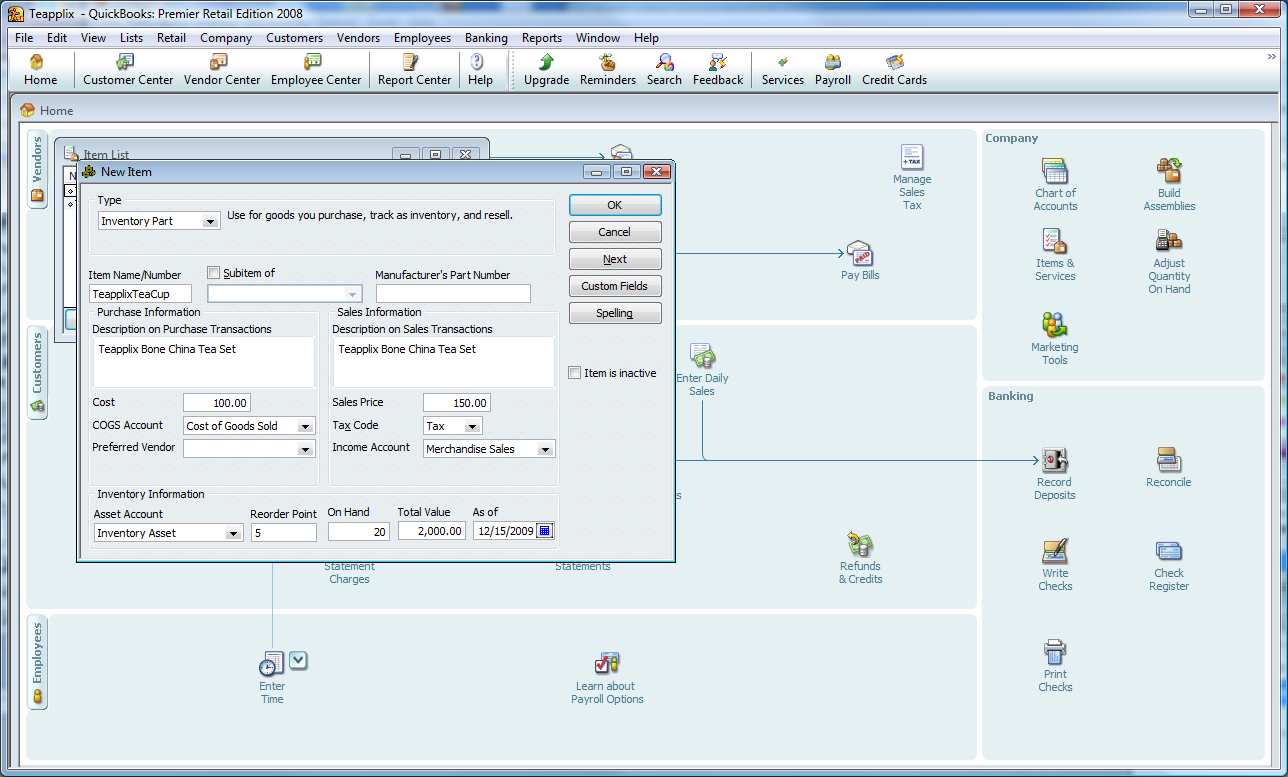
Teapplix can map the items you sell to the right inventory. To do that you need to create inventory items in your QuickBooks.

To create an inventory item, follow these steps:


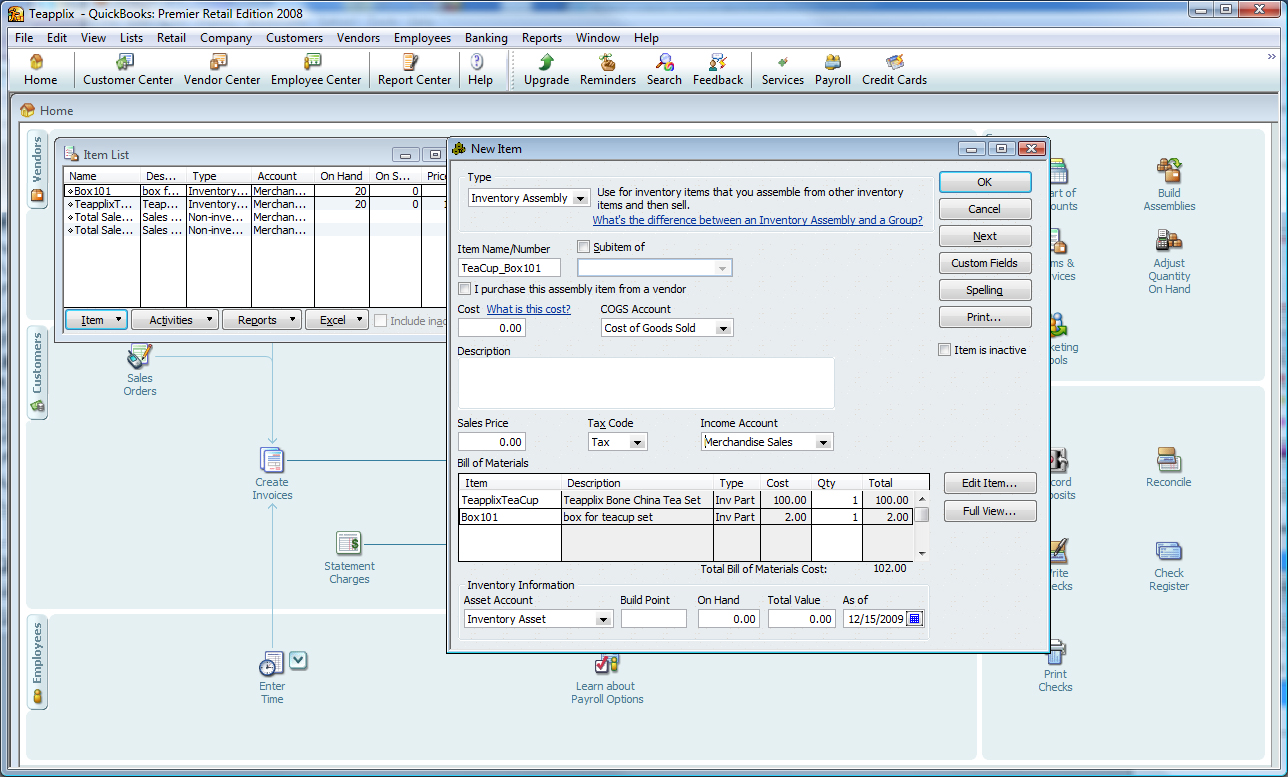
If you sell "kits", and you have QuickBooks Premier or above, you can create InventoryAssembly to represent a kit sold together with a single price:


Posted in QuickBooks Integration | 1,823 Comments

Exporting Orders

To export orders from Teapplix to QuickBooks, start your WebConnector program. With your QuickBooks company file open, click on the "Update Selected" button on WebConnector to export up to 100 orders:

QuickBooks WebConnector

If you leave your QuickBooks company file open, and leave WebConnector running, WebConnector by default performs an "Update Selected" once every day. You can also change the interval by typing a different number into the WebConnector "Every_Min" field.

Debugging Order Export

If you have orders in "Unexported orders" list that are not exporting after the above steps, follow these steps for some initial debugging steps:

  1. Review the Teapplix "Integration Setup" links and make sure your setup is complete. Make sure no entries is "Not Selected"
  2. Orders without item name, non 0 quantity and price will not export. Click on the "update" link to fix them and they will export next time.
  3. If you setup Teapplix to skip orders without matching QuickBooks inventory item, review your "no matching item" link to make sure there is no entry on that screen. You may need to create some inventory items in QuickBooks, and perform a "Update Selected" in WebConnector to populate the drop down on this screen.
  4. On Teapplix QuickBooks tab, click on View Log link and check for error messages
  5. On your WebConnector, is there any red error messages after you press "Update Selected"? If so your setup may not be complete.
  6. Is the order paid with PayPal and very recent? If so Teapplix won't export it until matching eBay info comes in. This wait could be up to a few hours. (This does not apply to Teapplix TConnect application)
  7. (No applicable to TConnect) If you have orders not even in Teapplix, you need to review your "Setup" tab to make sure you have integrated your order source to Teapplix properly. For example, Teapplix require you to setup both PayPal and eBay integration to get eBay orders.
  8. If all else fails, please contact Teapplix Support for help
Posted in QuickBooks Integration | Tagged , , | Comments Off on Exporting Orders

Creating “Discount” items to represent fees

To optionally track eBay, PayPal and Amazon fees, create items of the type "Discount". These discount items will be synced to Teapplix the next time you run "Update Selected" on WebConnector. After that, you will see these items in the Teapplix QuickBooks Integration Setup under the "Fees" section.

Create PayPal Fees:


Create Amazon Fees:


Posted in QuickBooks Integration | Tagged , , | 158 Comments

Customer Report Enhanced

We have enhanced our customer report. The report now has additional information:

  • amazon or ebay fees
  • ship date
  • actual shipping cost (current captured for usps only)
  • item information

In addition, there was a bug where the date filtering isn't working. This has been fixed

Posted in Site Updates | 153 Comments

Important upcoming change to Teapplix remember weigth system

We are planning a major enhancement to Teapplix remember weight system. This change is targeted to be released on January 25th after business hours. The change will affect how you save shipping methods.

Currently, for each item name, you can remember one domestic shipping method and one international shipping method:
Old Remember Weight

This old design do not handle the case for shopping carts where the customer can select different shipping methods. When the customer select a faster shipping method, often at an extra cost, this design do not take it into consideration.

To get around the case, Teapplix has some work-around in our current design. For example, Amazon orders has "-Standard", "-Expedited" appended to item names such that you can use a different remember weight entry for these.

However, as eBay now is moving to the same "shipping class" concept, and as Teapplix supports more shopping carts and marketplaces, appending shipping methods to item names no longer scale.

In our new design, we will allow 5 different shipping classes:

  1. Standard
  2. Expedited
  3. Second-day (domestic only)
  4. One-day (domestic only)
  5. Economy

Orders from eBay / Amazon and other shopping carts will be mapped to one of these shipping classes. We will gradually modify our shopping cart support to map to these shipping classes.

The remember weight screen will be modified to have multiple entries, one per shipping class:
New Remember Weight Screen

Continue reading

Posted in Site Updates | 162 Comments

How to link your Magento shopping cart to Teapplix

http://www.teapplix.com/forum/viewtopic.php?f=1&t=76

Posted in Howto, Site Updates | Tagged , | 45 Comments