Endicia DaZzle crash on APO DPO FPO addresses

We are hearing reports from multiple customers about DaZzle crashing when printing an APO address.

This issue is being worked on by Endicia:

The issue should only affect printing postage label and Customs form separately for APO/FPO addresses. If the customer uses the APO/FPO integrated form layout (layout name: APO FPO Priority Mail Shipping Label.lyt), the label should printed out without issue.

When printing APO Labels if you are not using the integrated APO FPO Mail Shipping Label.lyt, DAZzle retrieves the customs forms from the USPS. Unfortunately the USPS made some changes to the customs forms server which results in DAZzle crashing.

We are working on a new release of DAZzle which corrects the problem however the fastest solution is to use the integrated APO FPO Mail Shipping Label.lyt.

In the mean time, please print APO FPO DPO in separate batches using the layout above. In Teapplix, you can use the "APO" link under open orders to pick out APO address only.

Posted in Site Updates | Tagged , , | 841 Comments

Site outage 9/28 around 11:15pm

We had a hard disk crash on 9/28 around 11:15pm. The good news is that our backup process worked and we only lost about 5 minutes worth of updates.

Our fancy hardware raid controller didn't help us a single bit however, as the raid "stopped working" quite a while ago and the hosting company didn't notice.

What saved us is our off-site, remote database replication. We rely on hardware raid on our server as first line of defense. However, we also do remote database replication to another hosting company off-site in Florida. Without this last night we would have been in big trouble.

What does this mean for you

1. Outbound email ship notification will be delayed for 9/28 shipments.

2. Please check your transactions, especially your PayPal transactions, from 11:00pm last night (9/28) to 5am this morning to make sure nothing is missing.

If you see any missing transactions, we recommend you turn on PayPal alternative API integration for one day so it can catch the missing orders.

Please contact us if you have any issues.

Posted in Site Updates | Tagged , , | Comments Off on Site outage 9/28 around 11:15pm

What does RMA links do?

RMA link brings you to a page to create a copy of an order. The new order will be called "RMA-orderid" and will be in the Open Orders list. It is intended for shipping out replacements for defective, lost or missing items.

You can ship the RMA order, or you can put the RMA order on hold if you need to wait for returns to come in. You can put a note on the order about why it is on hold.

Hold orders are in Hold queue. They are not visible in the Open Orders list. From Hold list, you can generate postage paid USPS / UPS return shipping labels to send to customers for the return shipment. Make sure you check your Hold queue from time to time. Once you get the return, click on "options" and change the order back to normal queue and it will be back in Open Orders list ready to be shipped out.

Posted in Howto | Tagged , , | 162 Comments

Yahoo to Microsoft AdCenter Conversion

Got multiple calls to convert our Yahoo search account to Microsoft AdCenter. After 4 phone calls from several people I finally managed to convert our yahoo ads (well, most of them) into Microsoft.

I have to say the process isn't very smooth. Part of the planning you have to do is to make sure Microsoft length restrictions don't block your ads / titles. Seems like Microsoft allows shorter text.

Also, AdCenter isn't fast by any means. The rep recommended that I download and install the "Microsoft AdCenter Desktop" software.

Boy installing this software is quite an experience. 20 minutes and one reboot later, I am still just installing the "SQL Server 2008 Express Engine". That isn't even the app, just a component! At least Microsoft is very honest, their screen says "This installation is taking much longer than expected". Here's the screen shot for proof:

Microsoft AdCenter Desktop Installation

This experience is further proof of the superior nature of SaaS software like Teapplix. As you know most of our competitors are still desktop software. We were constantly reminded by customers that switched over of the crashes and installation headaches they ran into.

Well now the progress meeter just wrapped around and went back to zero, no I get to deal with that. Later...

Update, the install eventually failed. Desktop software 1, Teapplix 0:

AdCenter Install Error Code

AdCenter Desktop Install Failure

Posted in Site Updates | 170 Comments

Putting item pictures on the packing list

A seldom known feature of Teapplix is that you can put item pictures on the packing list.

This assumes that you have a picture of your item hosted somewhere. When you do "remember weight", in xref3 field, put your picture url like below:

[img]http://www.mypictureurl.....[/img]

Then, configure your packing list to include xref3. Now try generate packing list and you will see pictures.

Posted in Howto | Tagged , | 211 Comments

Turn on WebConnector debug

To debug WebConnector XML errors, you need to change the log level into "VERBOSE" mode from the normal "DEBUG" mode:

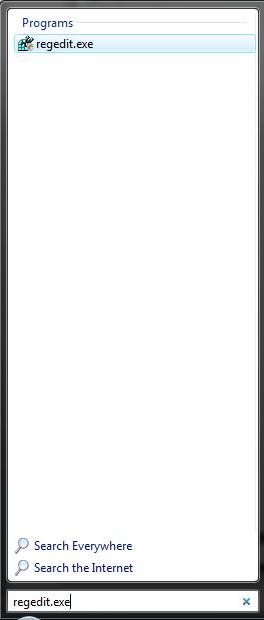
1. run regedit:
regedit

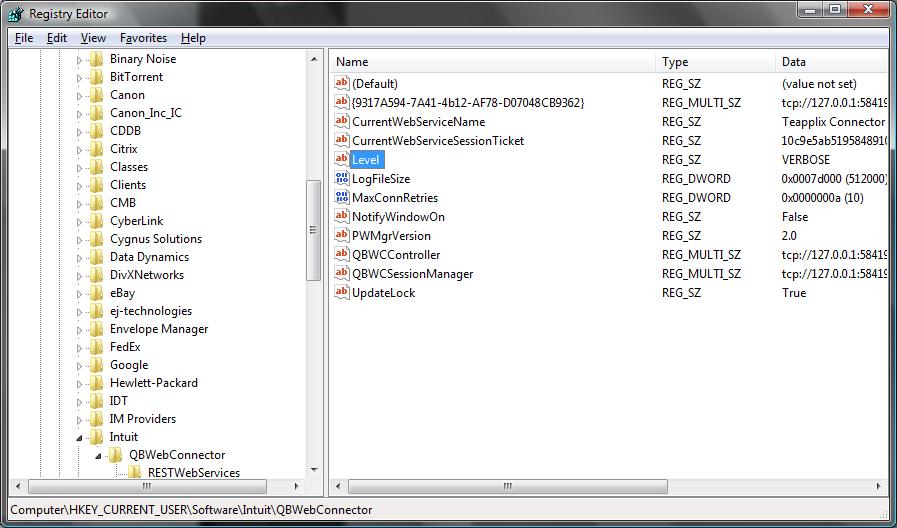
2. find HKEY_CURRENT_USER\Software\Intuit\QBWebConnector Entry
QBWebConnector Entry

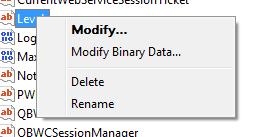
3. select the "Level" key and right mouse click, select "Modify":
Modify Level

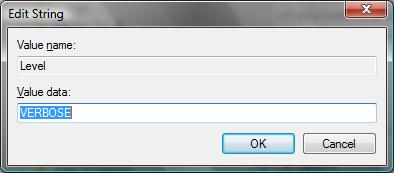
4. change the value from "DEBUG" to "VERBOSE"
Modify Level

5. Restart Web Connector, clear the log and perform a sync operation. The log will contain more detailed debug info. Note that the information in the log may contain sensitive data, please use caution when sending the log to thirdparties.

You should restore the "Level" key to "DEBUG" after the problem is found.

Posted in Howto, QuickBooks Integration | Tagged , | Comments Off on Turn on WebConnector debug